How to withdraw from FOMO
Last verified: October 27, 2026 (USDC-only crypto withdrawals, Face ID and the support address added from FOMO's own pages; the slippage advice corrected, since the app has had its own setting from October 8). Bank withdrawal route corrected against FOMO's documentation on September 17, 2026; see Route 2. We use FOMO with our own funds; the full FOMO review covers fees, custody and who it fits. This page only answers one question: getting money out.
The short answer: three routes out, and which one you get depends on where you live.
A withdrawal to a crypto wallet you control works everywhere. A direct withdrawal to a bank account is documented by FOMO, which states it is not available in every region and that funds land within three business days. If your region is not covered, the working path is two steps: wallet first, then an exchange you already use.
And there is a third route almost nobody mentions, which is the reason this app is safer than most: you can export your private key and open the same wallet in Phantom or Solflare, without asking FOMO for anything.
Route 1: withdraw to your own wallet
This is the normal path and it works. Sell what you want to convert, then withdraw the balance to an address you control.
Two details save people money and panic:
- Never sell 100% of a position. Leaving nothing behind for network costs is one of the most common causes of a failed sell, and a leftover under $0.95 hits the minimum fee.
- Check the address and the chain twice. A withdrawal to the right address on the wrong chain is not a support problem, it is a lost balance.
- Crypto withdrawals go out in USDC. FOMO's own guide tells you to make sure the receiving address accepts USDC on the network you pick source, and on Apple devices the app asks for Face ID before it sends source.
Once the funds are in your own wallet, they are out of the app entirely, and what you do next has nothing to do with FOMO.
Route 2: cashing out to money
FOMO documents a direct bank withdrawal. Its own guide, titled "A Guide To Deposits & Withdrawals: Crypto, Apple Pay, Debit Cards, and Bank Accounts" and dated December 25, 2025, says plainly that "withdrawals to bank accounts are not supported in all regions" source. Its help page adds that "withdrawals are processed and funds arrive in your bank within 3 business days", with weekends and bank holidays adding time source. So check whether your region is covered before you count on it.
More: how this page had the bank route wrong until September 17, 2026, and how it was fixed
We had this wrong. Until September 17, 2026 this page said no bank withdrawal was documented, and invited you to prove otherwise. It was documented, in two places, on FOMO's own site. We found it during an audit of our own pages and corrected it the same day. The date on this page moved with the fix rather than the fix arriving quietly.
The route that works everywhere, whatever your region: withdraw to your wallet as above, send to an exchange where you are already verified, sell there, withdraw to your bank.
Factor that extra step into how much you keep in the app. Money that has to travel through two more places before it is money is not emergency money.
Route 3: the export key, and why it matters
FOMO is built on Privy, and the private key is split by Shamir's Secret Sharing between your device and the login layer, so the company never holds a complete key source. The app has an export screen, with a warning page before it.
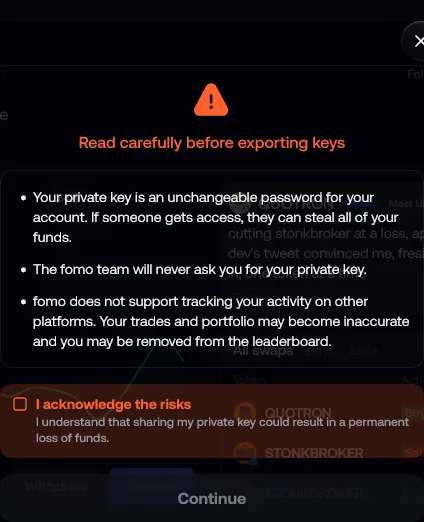
Export the key, import it into Phantom or Solflare, and you are holding the same wallet outside the app. Your funds stop depending on FOMO existing, on your login working, or on anyone approving anything.
That is the answer to the worst-case version of "how do I get my money out", and very few apps in this category can offer it. Treat the exported key like the crown jewels: anyone who sees it owns the wallet.
More: the SOL rent you can reclaim once the wallet is open in Phantom or Solflare
Solana users get a bonus from doing this: a normal wallet lets you close empty token accounts and reclaim the SOL rent locked inside them, which FOMO's interface does not surface.
Why your withdrawal is stuck
Most "FOMO won't let me withdraw" stories fall into a few known buckets. None of them are secret, and none of them are fixed by a link someone sends you.
| What is happening | What to do |
|---|---|
| An identity-verification hold on a fiat withdrawal. Users report these as temporary freezes until the KYC review completes | Complete the verification and wait it out. This is the single most reported friction in app store reviews |
| The sell fails before you can withdraw, on a thin token: slippage exceeded, the price moved faster than the quoted route | Check the slippage setting (in the app since October 8, 2026), retry, or sell in smaller chunks. An earlier version of this page said to raise slippage to 5 to 10%, at a time when the app had no setting for it |
| Selling the entire balance, leaving nothing for costs, or a remainder under $0.95 | Keep a small buffer, never sell to zero |
| Solana congestion: the order times out before validators confirm it | Retry outside the spike. Nothing is wrong with your account |
These fixes come from FOMO's own support guidance, checked August 17, 2026. If a sell keeps failing on a token that clearly has liquidity, that is worth a support ticket, and worth remembering when you size the next position.
Before it happens again
The habit that makes all of this smaller: keep in the app only what you are actively trading. A float, not a vault.
The apps in this category are convenient because they hold your trading balance close to the buy button. That is also exactly why a hold, an outage or a bad week hurts more than it should.
If you want the full picture on what FOMO costs and where its risks are, the review has the fee trap, the custody mechanism and the app store complaint themes. If you are comparing it against the alternatives, start with the comparison.
New tools the week they launch. The settings and fees that quietly cost you money. Alpha I would tell a friend.
Free, unsubscribe in one click. Spot an error on the site? Reply and tell me, it gets fixed the same day.
FAQ
Can you withdraw from FOMO to a bank account?
Yes. FOMO documents a direct bank withdrawal and states that it is not supported in all regions, with funds arriving within three business days once processed.
If your region is not covered, withdraw to a crypto wallet you control and off-ramp on an exchange where you are already verified.
How long does a FOMO withdrawal take?
A withdrawal to a wallet settles at the speed of the chain, so normally seconds to minutes. A bank withdrawal is quoted by FOMO at three business days, with weekends and bank holidays adding time.
The other delays people report are verification holds on the fiat side, not the blockchain.
Can I get my money out if the app stops working?
Yes, and this is the strongest thing about FOMO's design. Export your private key, import the wallet into Phantom or Solflare, and the funds are yours regardless of the app. Do it once, calmly, before you need it.
Why is my sell failing?
Almost always slippage on a thin token, selling to zero with nothing left for costs, or Solana congestion. The table above has the fix for each.
Is there a withdrawal fee?
The cost that catches people is not a withdrawal fee, it is the $0.95 minimum that makes small trades expensive on the way in and out. The review shows exactly where it bites.